CASE STUDY
EasyPhone:教程写出来了,老人从哪一步开始?
家人使用手机时遇到的困难,以及我在小区里看到的一些老人对手机操作的迟疑,让我想做一个手机求助工具。最初想法很直接:老人说出问题,系统告诉他怎么操作。
我后来判断,这个设想把最难的部分留给了老人:先准确描述问题,再理解教程,最后判断自己有没有做对。这来自我的观察、与 AI 的讨论和朋友交流,还没有经过老人任务测试。
我负责各版本的产品决定,全部代码由 AI 编程工具生成和修改。早期具体否决过哪些建议已经无法追溯,这里只写有记录的取舍和实现。
“微信没声音了”,还不足以开始一套教程
项目采用的这个示例,没有告诉系统用户在哪个页面,也没说是通话声音、通知声音还是设备音量。即便教程内容正确,用户也得先判断自己属于哪一种情况。
我把目标缩到“当前能做的一个动作”。低风险路径使用白名单教程,每次给一步,说明完成后应该看到什么,再让用户确认是否继续。教程覆盖不了的情况,保留澄清或求助出口。
这会增加点击次数。我选择先保留确认,因为点过一个按钮并不能说明问题解决了。它是否真的让老人更容易操作,仍需任务观察;当前不能用页面信息少,就推断认知负担已经下降。
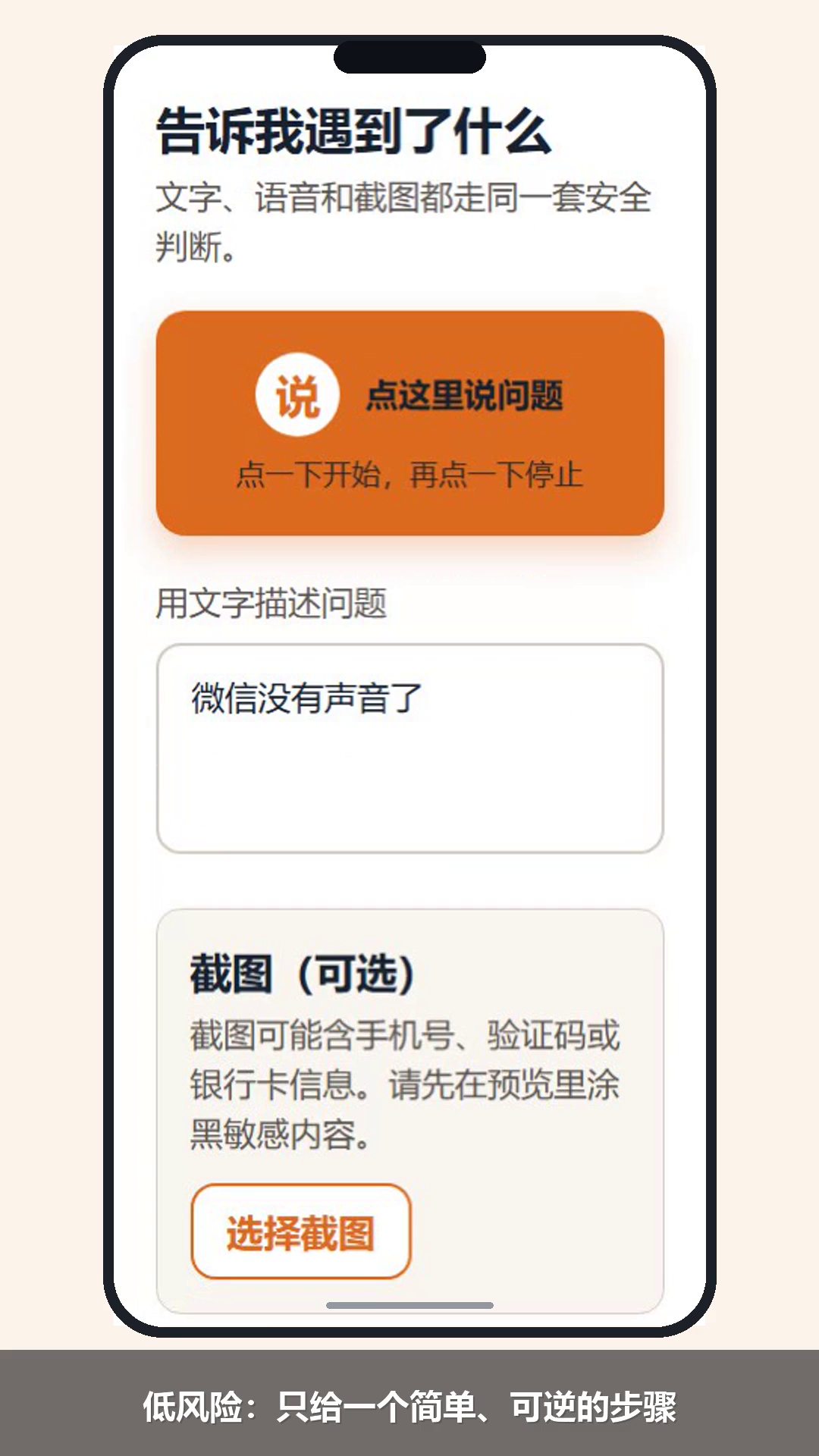
自动化浏览器演示,模拟手机视口和预设输入;不是老人真机使用记录。
语音识别出一句话,不能马上替用户提交
语音入口也需要确认。识别到的文字可能不是用户想说的内容,如果直接提交,错误会继续传到风险判断和教程选择。
实现把“识别出文字”和“确认提问”分开。现有浏览器测试用模拟语音识别输入检查:用户确认之前,决策接口的请求数应为零。这个断言对应的是一个明确行为,不能证明识别准确,也没有覆盖真实口音和环境噪声。
同样,教程推进不能只相信页面传来的步数。服务端负责检查进度,并在推进时重新检查风险,避免进入下一步后丢掉原有的限制。
看不清截图时,下一步应该停在哪里
有了截图也未必能判断。图片可能模糊,模型可能超时,文字和画面也可能冲突。我保留了“需要澄清”的分支,缺少信息时先停住,不继续猜按钮在哪里。
但风险停止又是另一回事。文字规则已经识别出验证码、转账或屏幕共享风险时,模型不能把它降成低风险;即使视觉服务故障,也不能把高风险变成普通澄清。
这些要求由 AI 落到决策链和测试里:高风险不能进入教程,视觉超时进入澄清,已有高风险在视觉故障时仍然停止。当前依据是固定样例和模型替身测试,并没有真实 Qwen 端到端验收记录。
中风险问题,也可能匹配到不该用的教程
风险分类完成后,教程选择还要再受一次限制。证据清单记录了针对教程风险上限的审计复现与测试:中风险问题不能被低风险教程接走。没有合适教程时,保留风险级别,生成谨慎求助卡。
这个约束容易被“找到了相关教程”掩盖。标题相关,不代表这份教程允许用于当前情况。把风险上限写进校验,之后增加内容时才有明确的检查依据。
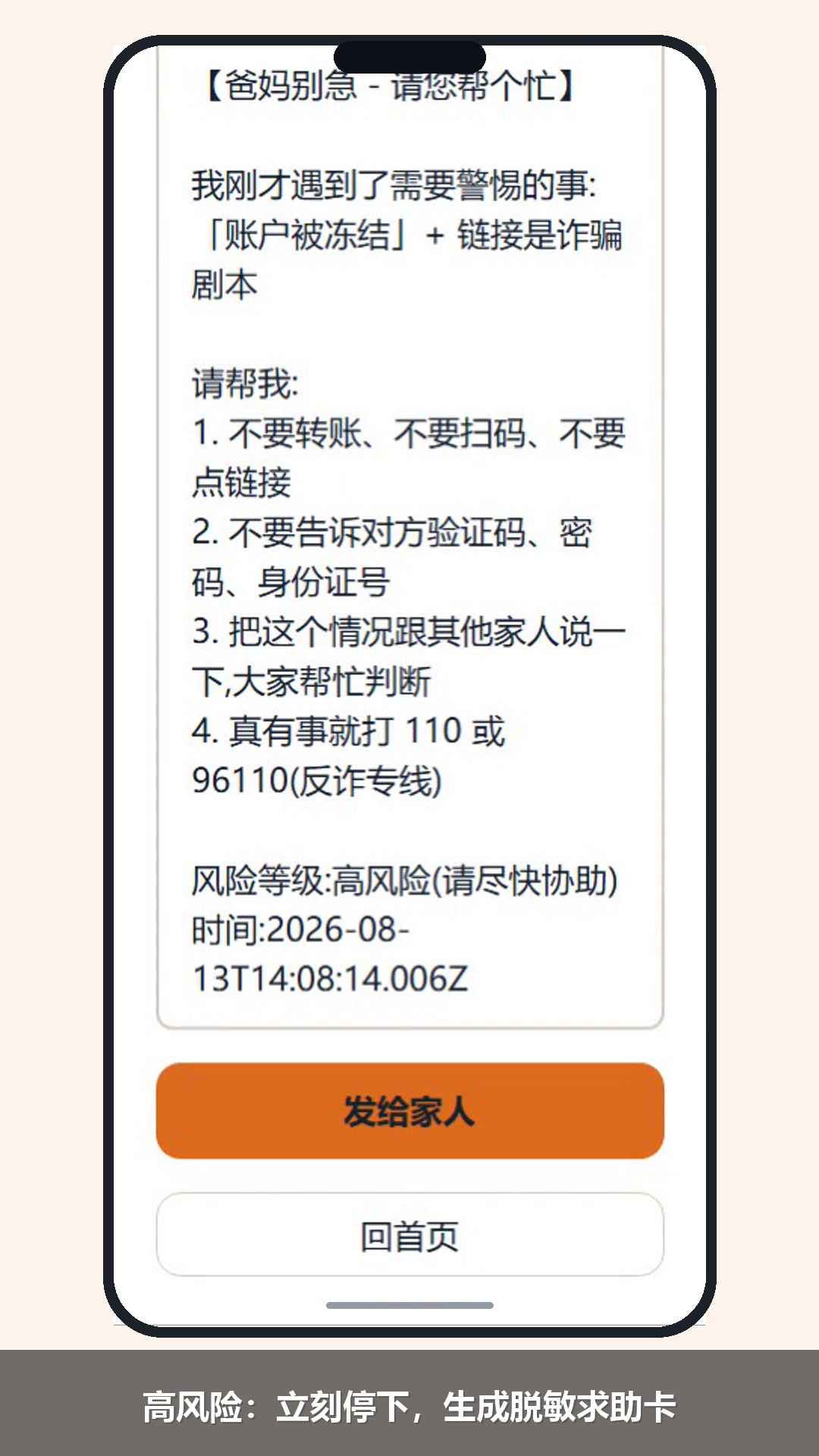
同一模拟演示中的停止页和脱敏求助卡。录制未执行真实分享,不能说明家人已经收到信息。
还没验证的,恰好是入口最难的部分
现有构建、单元测试和自动化记录能检查这些分支是否存在,却回答不了老人能否顺利说清问题、提供截图、理解成功信号,再把求助卡交给家人。截图涂抹和分享也缺少真机验收。
我下一步更想观察一个低风险任务,而不是先扩充教程。记录用户第一次停在哪里、需要谁帮忙。如果连求助入口都过不去,就先改入口。系统级无障碍和远程控制目前都没有实现,不能靠这次 Web 演示推断可行。
本文只使用 EasyPhoneAI-X 固定版本 bd0d1905d88167efb5702db0d9acc86e6d646e8f 的决策链与证据清单,不混用其他版本结果。本轮只核对材料,未重新运行测试。
EasyPhone: The tutorial was written—but where should an older user begin?
Seeing family members struggle with their phones, and noticing older people in my neighborhood hesitate over phone tasks, made me want to build a help tool. The first idea was simple: an older user describes a problem and the system explains what to do.
I later saw that this idea left the hardest work to the user: describe the problem accurately, understand the tutorial, and decide whether the task worked. That judgment came from observation, conversations with AI, and conversations with friends; it has not been tested through older-adult task observation.
I owned the product decisions across versions. All code was generated and modified by AI coding tools. I can no longer trace every early suggestion I rejected, so this case only describes choices supported by records.
“WeChat has no sound” is not enough to start a tutorial
The example used by the project does not say which screen the user is on, or whether the problem is call audio, notification sound, or device volume. Even a correct tutorial would require the user to decide which situation applies.
I narrowed the goal to “one action the user can take now.” The low-risk path uses allowlisted tutorials, gives one step at a time, explains what should be visible after completion, and asks the user whether to continue. Cases outside the tutorial keep a clarification or help exit.
This adds taps. I kept confirmation because pressing a button does not prove that the problem is solved. Whether confirmation really makes phone tasks easier for an older user still needs task observation; a less crowded page is not evidence that cognitive load has fallen.
An automated browser demo using a simulated phone viewport and preset input; not a record of an older person using a real device.
Recognized speech should not submit on the user’s behalf
The voice entry also needs confirmation. Recognized text may not be what the user intended. If it is submitted immediately, the mistake flows into risk detection and tutorial selection.
The implementation separates “speech recognized” from “confirm this question.” The browser test uses simulated speech-recognition input and checks that the decision endpoint receives zero requests before confirmation. That verifies a specific interaction rule; it does not prove recognition accuracy or cover real accents and background noise.
Tutorial progress cannot rely only on a step number sent by the page either. The server checks progress and rechecks risk when advancing, so the original safety constraint is not lost on the next step.
When the screenshot is unclear, the next step should stop
A screenshot does not guarantee a judgment. It may be blurry, the model may time out, or its text may conflict with the image. I kept a “needs clarification” branch so the system stops when information is missing instead of guessing where a button is.
Risk stopping is different. When text rules identify a verification code, transfer, or screen-sharing risk, the model cannot downgrade it to low risk. Even if the visual service fails, a known high-risk signal must still stop the flow.
AI translated those requirements into the decision chain and tests: high-risk input cannot enter a tutorial, a visual timeout becomes clarification, and an existing high-risk result still stops when vision fails. The evidence is fixed examples and model-substitute tests, not a real Qwen end-to-end acceptance record.
A medium-risk problem can still match the wrong tutorial
After risk classification, tutorial selection needs another constraint. The evidence checklist records an audit reproduction and tests for the tutorial risk ceiling: a medium-risk problem cannot be handled by a low-risk tutorial. When no suitable tutorial exists, the system keeps the risk level and creates a cautious help card.
This constraint is easy to hide behind “a related tutorial was found.” A related title does not mean the tutorial is permitted for the current situation. Making the ceiling explicit gives future content a clear rule to check.
The stop page and redacted help card from the same simulated demo. Sharing was not executed against a real recipient, so this does not show that a family member received the message.
The hardest part of the entry is still untested
The current build, unit tests, and automation records can check that these branches exist. They cannot answer whether an older user can describe the problem, provide a screenshot, understand the success signal, and hand the help card to a family member. Screenshot redaction and sharing also lack real-device acceptance.
My next step is to observe one low-risk task instead of expanding the tutorial library. I want to record where the user first stops and who they need. If the help entry itself is too hard, that comes first. System-level accessibility and remote control are not implemented; this Web demo cannot establish that they will work.
This case uses the decision chain and evidence checklist from EasyPhoneAI-X fixed version bd0d1905d88167efb5702db0d9acc86e6d646e8f (decision chain). I did not mix evidence from other versions. This pass checked the materials only; it did not rerun tests.